Docker Build Cloud
What is Docker Build Cloud?
Docker Build Cloud is a managed builder service that offloads Docker image builds to the cloud. Builds run on Docker's cloud infrastructure without consuming local machine or CI/CD agent resources.
Key Features
| Feature | Description |
|---|---|
| Faster builds | Dedicated cloud builders — builds of 15–20 minutes have been reduced to 110 seconds |
| Shared cache | Build cache is shared across team members — no re-downloading the same dependencies |
| Multi-architecture builds | Native ARM / AMD builder pair — no emulation needed for linux/amd64 and linux/arm64 |
| Parallel builds | Multiple concurrent builds (Pro: up to 4, Team/Business: unlimited) |
| Granular caching | Persistent cache mounts that survive even when layer cache is invalidated |
CI/CD Cost Reduction
Shorter build times mean expensive high-spec agents spend less time running, reducing overall CI/CD costs.
Reading the Management Dashboard (Overview)
The Build Cloud > Overview page in Docker Hub lets you monitor build usage. You can filter by date range.
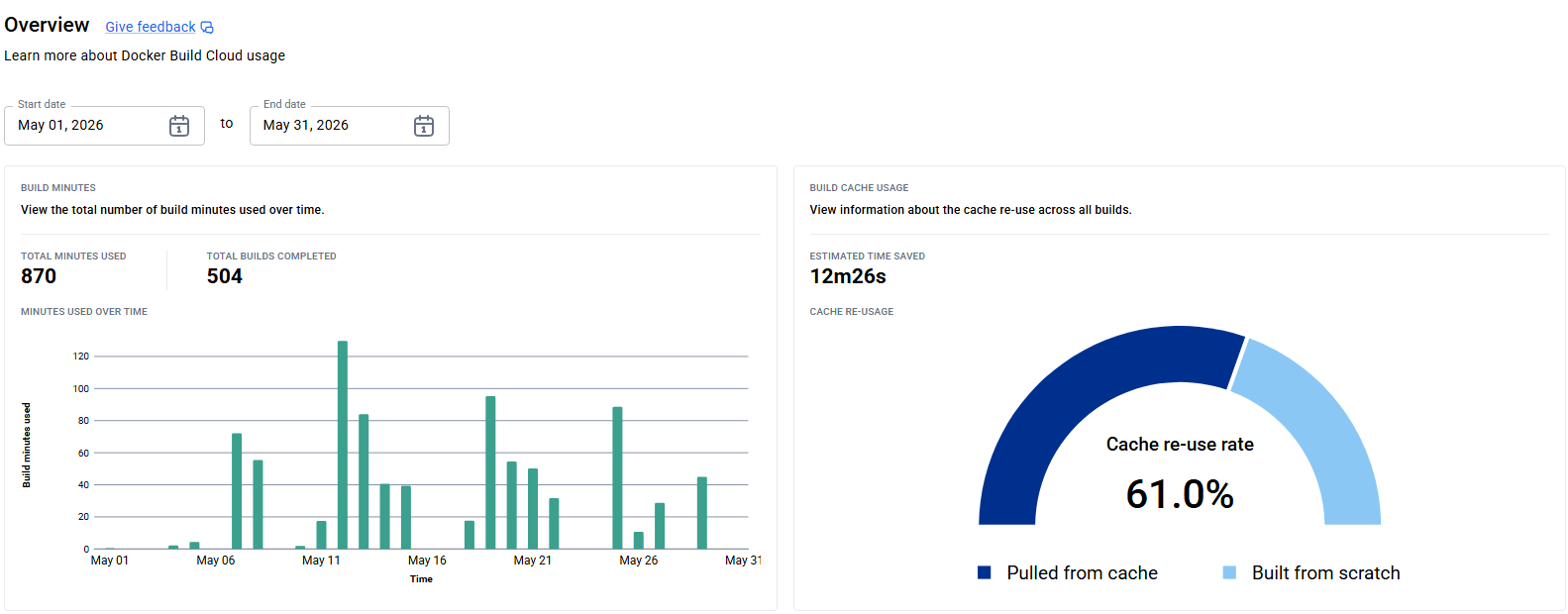
BUILD MINUTES (left panel)
| Metric | Description |
|---|---|
| Total Minutes Used | Total build minutes consumed in the period |
| Total Builds Completed | Number of builds completed in the period |
| Minutes Used Over Time | Daily build minute usage as a bar chart |
The bar chart makes it easy to spot CI/CD activity patterns and peak build days — useful for investigating deployment frequency changes or usage spikes.
BUILD CACHE USAGE (right panel)
| Metric | Description |
|---|---|
| Estimated Time Saved | Total estimated build time saved through cache reuse |
| Cache Re-usage (gauge) | Cache reuse rate (%) across all builds |
The gauge uses two colors:
| Color | Meaning |
|---|---|
| Dark blue (Pulled from cache) | Proportion of build steps served from cache |
| Light blue (Built from scratch) | Proportion that could not use cache and ran from scratch |
A higher cache re-use rate means better efficiency. Optimizing Dockerfile instruction order and layer design improves this rate.
Write instructions in order of "least frequently changed first." Place dependency installs (npm install / dotnet restore) before COPY of source code so that cache is invalidated only when dependencies change, not on every code change.
Azure DevOps Integration
Difference from GitHub Actions
GitHub Actions provides docker/setup-buildx-action which automatically installs the docker-buildx plugin. Azure DevOps hosted agents have no equivalent task, so the docker-buildx CLI plugin must be installed manually within the pipeline steps using Linux commands.
Prerequisites
| Item | Description |
|---|---|
| Docker Hub account | Plan with Build Cloud enabled (Pro / Team / Business) |
| Docker Hub PAT | Personal access token with read, write, delete scope |
| Azure Container Registry | Push destination for built images |
Pipeline Variable Configuration
Register the following in Azure DevOps pipeline variables (or a Variable Group). Mark DOCKER_PAT as a secret variable.
| Variable | Description |
|---|---|
DOCKER_PAT | Docker Hub PAT (secret variable) |
DOCKER_ORGANIZATION_NAME | Docker Hub organization name |
DOCKER_USER_NAME | Docker Hub username |
DOCKER_BUILDER_NAME | Builder name created in Build Cloud |
Reusable Step Template
The following is an example reusable step template (templates/steps/docker-buildx-build-and-push-template.yml).
parameters:
  - name: DOCKER_PAT
    type: string
  - name: DOCKER_ORGANIZATION_NAME
    type: string
  - name: DOCKER_USER_NAME
    type: string
  - name: DOCKER_BUILDER_NAME
    type: string
  - name: serviceName
    type: string
  - name: azureSubscription
    type: string
  - name: azureContainerRegistryName
    type: string
  - name: tag
    type: string

steps:
  # Step 1: Manually install docker-buildx and create the Build Cloud builder
  - task: CmdLine@2
    displayName: Setup Docker Build Cloud
    inputs:
      script: |
        ARCH=amd64
        mkdir -p ~/.docker/cli-plugins

        # Fetch the linux-amd64 binary URL from docker/actions-toolkit's release manifest
        BUILDX_URL=$(curl -s https://raw.githubusercontent.com/docker/actions-toolkit/main/.github/buildx-lab-releases.json \
          | jq -r ".latest.assets[] | select(endswith(\"linux-$ARCH\"))")

        curl --silent -L --output ~/.docker/cli-plugins/docker-buildx $BUILDX_URL
        chmod a+x ~/.docker/cli-plugins/docker-buildx

        # Log in to Docker Hub with PAT to enable Build Cloud access
        echo "${{ parameters.DOCKER_PAT }}" | docker login \
          --username ${{ parameters.DOCKER_USER_NAME }} --password-stdin

        # Create the cloud builder (driver: cloud)
        docker buildx create \
          --driver cloud \
          ${{ parameters.DOCKER_ORGANIZATION_NAME }}/${{ parameters.DOCKER_BUILDER_NAME }}

  # Step 2: Log in to ACR and build & push the image
  - task: AzureCLI@2
    displayName: Build and push ${{ parameters.serviceName }} docker image
    inputs:
      azureSubscription: '${{ parameters.azureSubscription }}'
      scriptType: bash
      scriptLocation: inlineScript
      inlineScript: |
        az acr login --name ${{ parameters.azureContainerRegistryName }}

        # Builder name follows the pattern "cloud-<org>-<builder>"
        docker buildx build \
          --builder cloud-${{ parameters.DOCKER_ORGANIZATION_NAME }}-${{ parameters.DOCKER_BUILDER_NAME }} \
          -f $(Build.Repository.LocalPath)/${{ parameters.serviceName }}/Dockerfile \
          -t ${{ parameters.azureContainerRegistryName }}.azurecr.io/${{ parameters.serviceName }}:${{ parameters.tag }} \
          $(Build.Repository.LocalPath)

        docker push \
          ${{ parameters.azureContainerRegistryName }}.azurecr.io/${{ parameters.serviceName }}:${{ parameters.tag }}
Key Points
Manual docker-buildx Installation
BUILDX_URL=$(curl -s https://raw.githubusercontent.com/docker/actions-toolkit/main/.github/buildx-lab-releases.json \
  | jq -r ".latest.assets[] | select(endswith(\"linux-$ARCH\"))")
curl --silent -L --output ~/.docker/cli-plugins/docker-buildx $BUILDX_URL
chmod a+x ~/.docker/cli-plugins/docker-buildx
- GitHub Actions'
docker/setup-buildx-actionperforms the equivalent steps internally - Since no equivalent task exists in Azure DevOps, installation is done manually inside a
CmdLine@2task - The binary is placed in
~/.docker/cli-plugins/and made executable - The URL is fetched from
docker/actions-toolkit's release JSON to always get the latest Build Cloud-compatible buildx
Builder Naming Convention
A builder created with docker buildx create --driver cloud <org>/<builder> is referenced during builds as:
cloud-<DOCKER_ORGANIZATION_NAME>-<DOCKER_BUILDER_NAME>
Why Docker Hub Login is Required
Build Cloud builders are tied to a Docker Hub account. Authenticating with docker login grants access to the cloud builder. ACR authentication is handled separately via az acr login.
Monthly Build Minute Limits and Fallback
The Business plan has a hard limit of 1,500 build minutes per month. When the limit is exceeded, docker buildx build fails with an error and the entire pipeline stops. Depending on your CI/CD frequency, usage can approach the cap toward month-end. It is strongly recommended to add an automatic fallback to a local build in your pipeline.
Build minute limits by plan:
| Plan | Monthly limit |
|---|---|
| Pro | 200 min |
| Team | 500 min |
| Business | 1,500 min |
Fallback Pattern
When a Build Cloud build fails, automatically fall back to a local builder (standard docker build) on the agent.
  - task: AzureCLI@2
    displayName: Build and push ${{ parameters.serviceName }} docker image
    inputs:
      azureSubscription: '${{ parameters.azureSubscription }}'
      scriptType: bash
      scriptLocation: inlineScript
      inlineScript: |
        az acr login --name ${{ parameters.azureContainerRegistryName }}

        IMAGE=${{ parameters.azureContainerRegistryName }}.azurecr.io/${{ parameters.serviceName }}:${{ parameters.tag }}
        DOCKERFILE=$(Build.Repository.LocalPath)/${{ parameters.serviceName }}/Dockerfile
        CONTEXT=$(Build.Repository.LocalPath)

        # Attempt Build Cloud first; fall back to local build on failure
        if docker buildx build \
            --builder cloud-${{ parameters.DOCKER_ORGANIZATION_NAME }}-${{ parameters.DOCKER_BUILDER_NAME }} \
            -f $DOCKERFILE -t $IMAGE $CONTEXT; then
          echo "##[section]Build Cloud build succeeded."
        else
          echo "##[warning]Build Cloud build failed (quota exceeded or unavailable). Falling back to local build."
          docker build -f $DOCKERFILE -t $IMAGE $CONTEXT
        fi

        docker push $IMAGE
Fallback Behavior
| Situation | Behavior |
|---|---|
| Build Cloud succeeds | Build on cloud builder → push to ACR |
| Build Cloud fails (quota exceeded, outage, etc.) | Build locally on agent → push to ACR |
docker pushruns against the same image tag on both paths, so downstream deployment steps require no changes- The
##[warning]log line makes the fallback visible in Azure DevOps pipeline logs - If fallbacks occur repeatedly, check Total Minutes Used in the dashboard and consider raising the plan limit or reducing unnecessary builds
Calling Pipeline Example
- template: templates/steps/docker-buildx-build-and-push-template.yml
  parameters:
    DOCKER_PAT: $(DOCKER_PAT)
    DOCKER_ORGANIZATION_NAME: $(DOCKER_ORGANIZATION_NAME)
    DOCKER_USER_NAME: $(DOCKER_USER_NAME)
    DOCKER_BUILDER_NAME: $(DOCKER_BUILDER_NAME)
    serviceName: my-api
    azureSubscription: my-azure-service-connection
    azureContainerRegistryName: myregistry
    tag: $(Build.BuildId)